



Taxon Profiles
The Taxon Profiles tool replaces the Survival, Reproduction and Growth Report. Taxon Profiles acts as a single comprehensive resource where users can discover more about species managed globally within ZIMS. IUCN Red List status, CITES listing, Studbook and Species holding figures can be viewed in one area, alongside a wealth of reports on Survival, Reproduction and Weights.
Topics
Weight reports
Role Management
Role access can be granted by a Local Admin through Role Management under Global Reports and Tools > Taxon Profiles.

If a user had access to Survival, Reproduction and Growth Reports, they will automatically have access to Taxon Profiles. Any other users will need access to be granted by their Local Admin.
Access
When logged into ZIMS through https://zims.species360.org you can access Taxon Profiles from the ZIMS Start Menu> Global Resources > Animal Management/Husbandry > Taxon Profiles when you have been granted permissions. Note, users will need to have Taxonomy/Basic Information permissions in their assigned role to see taxon profile results.

Once accessed, Taxon Profiles will open as a new tab within your internet browser in the new sub-domain: https://zims2.species360.org/taxa
It’s also possible to directly access a Taxon Profile for a species by adding the scientific name to the URL, for example: https://zims2.species360.org/taxa/gorilla gorilla
Ensure gaps are left between genus and species (gorilla gorilla NOT gorillagorilla).
When using the new features, you will see a new navigation menu option:
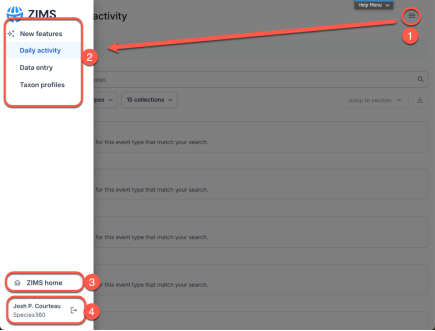
- The menu at top right will open...
- The side-bar navigation with options to switch to different tools.
- Access to the traditional ZIMS desktop is available here.
- Your current institution and the option to log-out is available here.
Your original ZIMS browser tab will remain open so navigation between the two is simple. Note, if you log-out in the Taxon Profiles, you will close your main ZIMS Session as well.
QR Codes
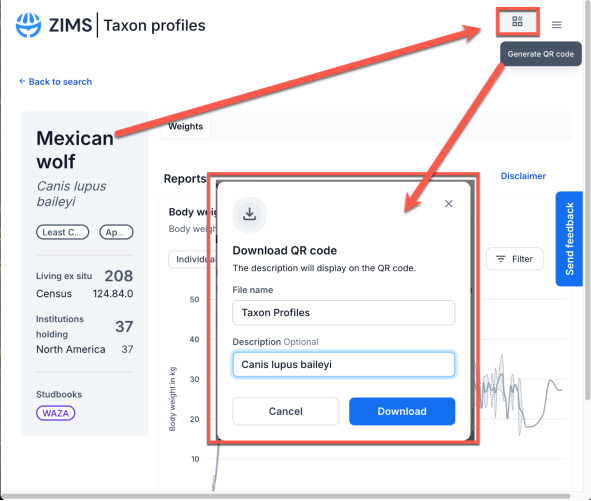
When you have loaded a specific species page, you can generate a QR Code for download. When scanning this link from a mobile device, users will be taken directly to the species information page.
Taxon List
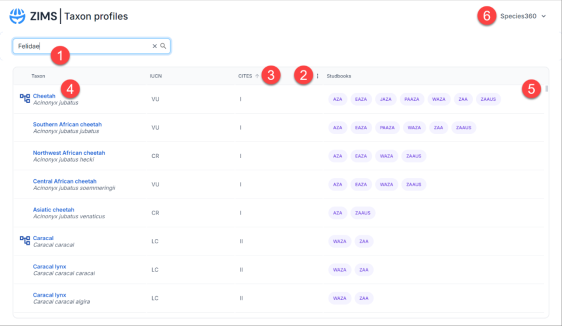 Taxon Profiles will initially display a search bar and blank state.
- Use the search bar to filter results by taxonomic rank of family or lower, or type the species name for specific searches.
-
Hover over a column and this icon
 will appear. Click this to open the column management dropdown.
-
 An arrow in the column indicates the list's sorting direction (ascending or descending).
- Click the species name to open its Taxon Profile. If this logo appears next to a species, it indicates that this Taxon Profile includes data from sub species too.
- The small scroll bar can be used to search through the list of taxa.Clicking on the institution name opens a dropdown which allows users to log out.
Taxon Profile
The Taxon profile is comprised of two main components. 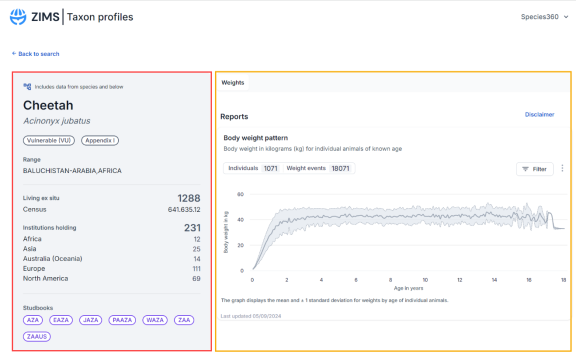
Highlighted in red, the left panel summary contains information such as CITES, IUCN status, Studbooks and Population size. This information is updated live from the ZIMS database each time a Taxon Profile is opened.
Highlighted in yellow, the right panel contains Global weight information. This information is updated quarterly. Reproduction and survival tabs will be developed and released at a later date.
For more information regarding data inclusion rules see this document here.
Weights reports
Click here to learn more.
Survival reports
Survival reports will be added in future releases.
Reproduction reports
Click here to learn more.
Revised 5 May 2026