



Pharmacy Inventory
Utilizing the Pharmacy Inventory System in ZIMS
Topics:
Important Guidelines
Using the Inventory
Bottle Details
Best Practices
Important usage guidelines
The Pharmacy Inventory module is primarily designed to help you track government-regulated drugs. If you are already legally required to log the purchase, usage, and disposal of these substances, this tool automates much of that paperwork for you.
What to Track
- Regulated Drugs: Best for high-stakes tracking where legal records are mandatory.
- Discrete Non-Regulated Drugs: You can track items like antibiotic tablets. However, the manual effort required to log every purchase and dose often outweighs the benefits for non-regulated items. Most institutions find this isn't worth the extra time.
What NOT to Track
- Non-Quantified Items: The system cannot accurately calculate remaining stock for items without fixed doses, such as sprays, ointments, or creams.
- Specific Exclusions: Do not use this module for vaccines, vitamins, fluids, or nutraceuticals.
A Note on Data Integrity
Please do not "misclassify" items in the treatment dictionary just to force them into the inventory module.
Why it matters: Accurate classification is vital for global reporting (like Drug Usage Extracts and Anesthesia Summaries). Species360 staff will monitor and correct any misclassified entries to ensure data remains reliable for everyone.
Using the Pharmacy Inventory
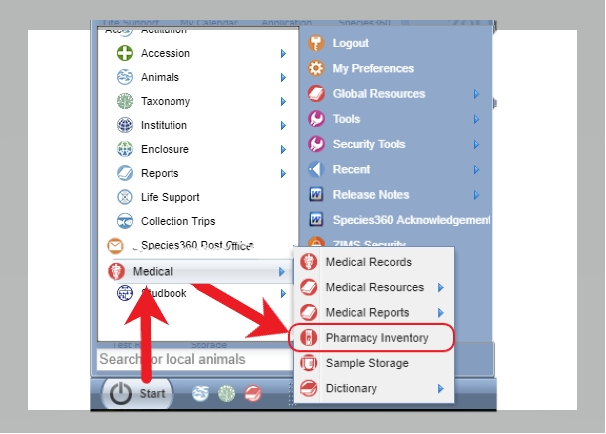
Navigate to the pharmacy inventory via Start > Medical > Pharmacy Inventory menu options:
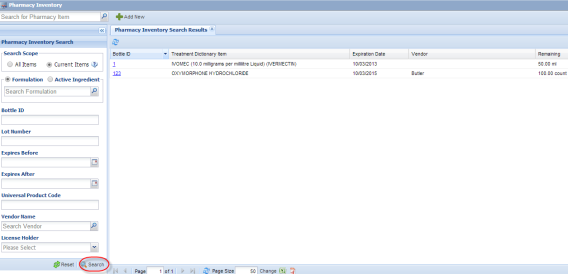
Upon opening Pharmacy Inventory module, you will be on the main search screen. The default scope is current pharmacy inventory items; leave the search parameters blank and click the Search button, to load all current items into the search results grid. Filter the list of inventory items using other fields in the search panel.
An item in the inventory is a single bottle or other container containing a specified starting amount of the drug (or drug combination) in the specified formulation.
For example:
- a bottle of 5 mg diazepam tablets with a starting count of 10 tablets could be an inventory item.
You must assign an individual and unique identifier to each container to allow tracking of dispensed amounts for that item.
Module reports include a “bottle” report that summarizes the purchase information, usage from linked prescription and/or anesthesia records, and any loss or discards for that inventory item.
Regulated drug items are associated with legally required records and usage records for these inventory items are “locked” once an item is marked as “finished” within the inventory system.
Locking item records prevents changing existing usage records or adding new usage records for that item, ensuring the integrity of your pharmacy inventory records. This locking ability and records that account for regulated drug usage on a bottle-by-bottle basis are key to meeting DEA record keeping requirements. If an item is accidentally locked before all usage records have been entered, the medical admin can unlock that item, but a record of the unlock process (and the reason) are maintained as part of the records for that inventory item.
Managing Inventory Items
In this module, an Inventory Item is defined as a single, physical container (like a bottle) with a specific starting quantity and formulation.
-
Unique Identification:
Every container must be assigned its own
unique ID
. This allows the system to track exactly how much is dispensed from that specific bottle.
- Example: A bottle containing 10 tablets of 5 mg Diazepam is treated as one unique inventory item.
Tracking and Reports
The system generates a "Bottle Report" for each item. This provides a clear audit trail by summarizing:
- Initial purchase details.
- Usage linked to prescriptions or anesthesia records.
- Any recorded loss or discards.
Record Security & Compliance
To meet legal requirements (such as DEA standards), the system uses a Locking Feature to ensure data integrity:
- Automatic Locking: Once an item is marked as "Finished," the record is locked. You cannot edit existing usage or add new entries.
- Regulatory Peace of Mind: Tracking usage on a bottle-by-bottle basis and locking finished records protects the history of your regulated drugs.
-
Corrections:
If an item is locked prematurely, a Medical Admin can unlock it. However, the system will require a reason and maintain a permanent log of the unlock for auditing purposes.
Adding a New Inventory Item:
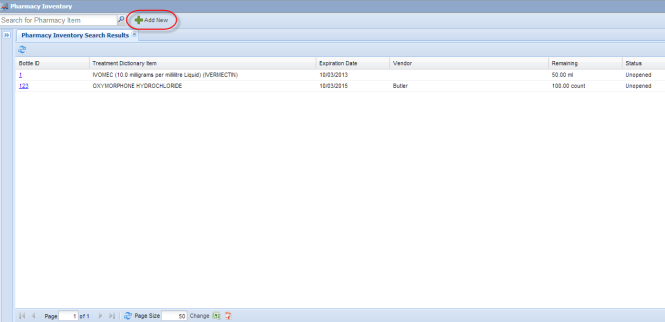
Click "Add New" button at the top of the Pharmacy Inventory screen to add a new item to your inventory
The “Add New Pharmacy Item” screen will appear, allowing addition of a new bottle or other container of a drug to the inventory.
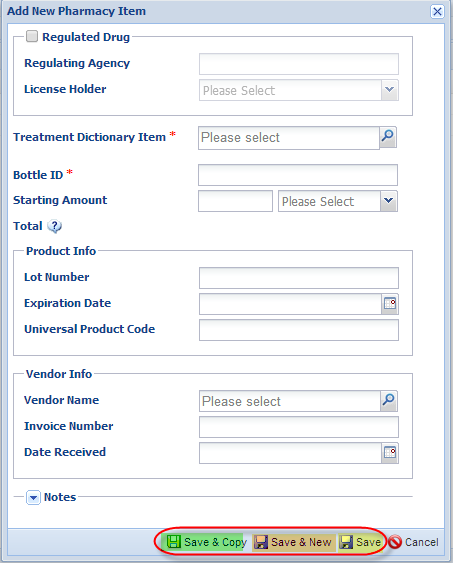
When you are entering a new pharmacy item, please note the following:
- Red asterisks denote the required data fields
- If the item is a regulated drug (you are legally required to keep inventory records), check the “regulated drug” box and then the regulating agency and license holder fields will become active. License holder drop down is populated from your Staff list and regulating agency from the Institution list in ZIMS
- Bottle ID (a drug container identifier) is a unique number that you assign to the drug bottle/container as it goes into inventory; that identifier should be written directly onto the container itself so that all dispensing activity can easily be linked to the correct inventory item. Prescription dispensing records and anesthesia records use this bottle id to track drug usage from this specific container. While you can make this bottle identifier as complex as you want, remember that you will have to enter this information into anesthesia and prescription records as you track drug usage; simpler, shorter identifiers will have an advantage during that data entry phase
You have three options for saving data.
- If you are entering one item, just use the save in yellow.
- If you entering several different items, the save in orange will save your entry and wipe the contents so you can start uninterrupted entry on the new item.
- If you creating several entries of the same item (e.g., 6 bottles of ketamine just purchased from the same vendor), the save in green will save your current entry and keep the core information so you only have to enter the information that has changed. This will significantly reduce data entry efforts when items are purchased in bulk.
Return to Index
Bottle Information Details
A search of the pharmacy inventory yields a list of items that match based on the selection criteria chosen. The left column of the results grid displays the Bottle ID for the item with a hyperlink.
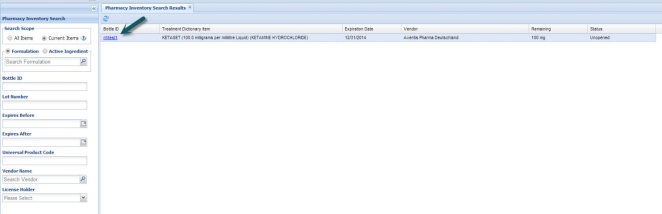
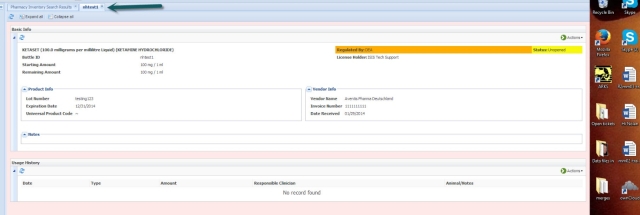
Clicking the Bottle ID Hyperlink opens a new tab with complete details for that item, including the purchasing information, current item status and any existing prescription or anesthesia usage records for this item.
Return to Index
Best Practices in Using the Inventory
The following topics should help you better understand the appropriate use of the Pharmacy Inventory module.
Vaccines and Nutraceuticals...
Not supported by this version of the pharmacy inventory module. Do not attempt to bend the rules to enter these types of items into the inventory as routine maintenance the drug dictionary is required for the Drug Usage Extracts and Anesthesia Summaries resources and that maintenance will disable tracking of these types of items within your inventory.
Ointments, sprays and other topical drug treatments
…
It is not possible to automate usage tracking for pharmacy inventory items that are not used in discrete and easily quantified amounts. Attempts to use this module to track the usage from jars of ointment or spray bottles of flea medication will not yield satisfactory results; we strongly recommend not adding these types of items to the pharmacy inventory.
Tracking a bottle start to finish...
When tracking regulated (controlled) drugs, there are a few tips that will ensure your records are accurate and complete.
Registration:
Add items using the specific tradename and formulation information. This will produce more flexibility during data entry of prescription and anesthesia records. If the drug container has been registered as Ketaset (100 mg/ml solution) (Ketamine), then anesthesia records that use either Ketaset or ketamine as the drug entry will be able to link to the inventory record. However, if a bottle registered as the generic product Ketamine (100 mg/ml solution) (Ketamine) will not link to the inventory records if the user (looking at the bottle label) enters Ketaset into the anesthesia record (there is no Ketaset registered in the inventory).
Log/register each bottle in ZIMS as it arrives at your institution and write the unique Bottle ID onto the item as it is registered. You probably have easiest access to the DEA required vendor and invoice information, as the drugs are unpacked. This workflow also ensures that every item in the secure drug cabinet is already in the ZIMS system; you cannot end up in the field doing an immobilization with an unregistered bottle of ketamine that has no bottle id and will require extra work to fix all the worksheets and the records when the procedure is completed.
We recommend you enter the starting amount in milligrams and record all usage in milligrams. Volumes can be more ambiguous; calculating the amount used depends on the concentration of the drug and if there is an error in the concentration, it impacts every usage record that is linked to a volume of drug
Do not forget about the “save and copy” feature during inventory registration. If you have just received 10 bottles of the same drug, most of the information entered will be the same for each bottle. Using the Save and Copy, ensures that information such as drug name, vendor, invoice number, lot number and expiration date are retained for the next entry, and often just the unique bottle id will need to be entered for each additional item.
Marking as Finished/Closing an item:
When a bottle of drug is physically empty, the clinician responsible for the bottle (usually the license holder) should go to the details tab for the item and review all usage records to ensure that the ZIMS records account for the entire contents of the item. If the records are complete and correct, the item can be marked as closed (Actions menu, top right, of the item details screen). Marking the item as finished locks the existing usage records (no edits allowed) and prevents anyone from creating a new usage record for that item.
Once a bottle is marked finished, we recommend printing the final bottle usage report, then sign and date the report and file with your other DEA records to make it easier to show compliance during an audit of your drug inventory.
Note: For regulated drugs, if there is a discrepancy greater than 10% between the starting volume and the usage records, you will not be able to close the item. This amount of error between physical usage (the bottle is empty) and the recorded usage is not considered acceptable to meet DEA requirements. Review and correct usage records as needed and when the recorded usage is within 10% of the starting amount, mark that item as finished.
Recording loss:
Add usage record in "usage history" grid for entire (if unopened) or remaining amount (if open). For usage type select "discard". Add usage note that drug was expired and what is happening with the bottle (sent out for disposal/destruction, etc.). After entering the discard usage record, you can then mark the bottle as finished (basic info>actions>mark as finished).
Modifying a closed bottle:
Mistakes happen and you may end up with an inventory item that is marked as finished, but some usage records need modification. Only a medical administrator at your institution can reopen a bottle marked as finished. ZIMS will automatically create an audit trail, noting the date and responsible party that reopened the item. This audit trail information is in red text at the bottom of the bottle usage details screen, and cannot be edited or removed. Records for your controlled/regulated drug inventory are a legal obligation. Revisions made after the bottle has been marked finished should be uncommon and justifiable to regulating authorities. Careful review of records prior to marking a bottle as closed should minimize the need to re-open them for revisions.
Special circumstances:
Bottle records without formulation information: If you had bottles migrate into ZIMS from MedARKS, you may have some inventory registered with the starting amount value in only mg or only ml and no drug concentration or formulation information.
This can cause problems when the system attempts to calculate remaining amounts for the item.
It is important in these circumstances to be consistent with your data entry and create usage records that match the unit of measure used when the bottle was registered
.
Examples:
- If a bottle of tramadol was registered as containing 100 tablets with no concentration listed, the prescriptions need to be formulated as follows:
Select “tramadol” for drug name. Write your prescription to include a dose (50mg) and dosage as usual. Add the concentration in the box on the lower right (50 mg tablet) and ZIMS will calculate that the amount administered for each dose is “1 count”. Dispensing/usage records should indicate the number of tablets given out. This ensures that your inventory will calculate properly.
- If a bottle of tramadol was registered as containing 5000mg without a tablet count, you would need to formulate the prescription as follows:
Select “tramadol” for drug name. Write prescription to include a dose (50mg) and dosage as usual. Do NOT add the concentration in the box on the lower right. ZIMS will indicate “50mg” as the amount administered for each dose. Dispensing/usage records should indicate the total number of mg used. All usage records for this bottle will be in mg, ensuring your inventory records calculate properly.
Note: For bottles registered with only mg or only volume starting amounts and no drug concentration/formulation information, but with mixed usage records (some usage in mg and some in ml), the system will not be able to correctly calculate remaining amounts.
If you see this discrepancy in your inventory records, you will need to go into each usage record and edit it to match the unit of measure that designated when the bottle was registered. This editing process can be confusing; contact support@species360.org if you are having problems with these historical records. To avoid this problem with new inventory records, consistently register new bottles using the best practice recommendations detailed above. You will gain flexibility within the prescribing process, and your inventory records will remain accurate.
Drug Mixtures/”Drug Cocktails”:
Commercially purchased mixtures of drugs are not a problem for the pharmacy inventory. The manufacturer specifies the mixture of drugs and the amounts of each drug within a single bottle or vial. Purchase, registration and usage from that single drug container is handled the same as any other pharmacy inventory item, with each entry recording the total volume or amount (mg) of drugs used from the container.
However, when you mix two controlled drugs from separate bottles into a single dart or into a single bottle to produce a custom formulation, you remain required by law to report the usage from each individual drug bottle. Under these conditions, rather than creating a new drug dictionary entry called BKX that states the concentration of butorphanol, ketamine and xylazine in your custom mix and then registering a bottle of that mixture in your inventory, you will generally find it easier to maintain separate inventory items for each purchased bottle or vial.
-
Example: You purchase a bottle of Ketamine and a bottle of Telazol (tiletamine & zolezepam) and assign them bottle id’s of K1 and T1 respectively. Now take 5 ml of liquid drug from K1 and add it to the 500 mg T1 bottle to dissolve that drug (supplied as a powder). The T1 vial now contains a custom (non-commercial) Telazol-ketamine mix in the same vial. Each ml of your TK mixture has about 100 mg of Ketamine and 100 mg of Telazol. You could create this TK mix in the drug dictionary as a compounded item, relabel the T1 vial as TK1, create a new pharmacy inventory item and record all usage against the TK1 bottle id. However, both of these drugs are specified as controlled substances by DEA and legally you need to be able to completely report usage from each purchased bottle of each drug. Specifying usage for a TK1 item in the inventory, makes reporting usage for the purchased bottles K1 and T1 becomes much more complicated.
For this reason, we recommend that you track usage from each original bottle separately within the ZIMS records. Label the T1 vial to make it clear that it now contains 100 mg/ml ketamine from bottle K1 in addition to the Telazol. Whenever the drug mixture is used, you will actually make two ZIMS entries – one entry saying xx mg was used from bottle T1 and the second entry saying yy mg was used from bottle K1. ZIMS now has 2 separate drug entries and can directly track usage from both K1 and T1 bottles. When you run the report for K1, it now shows every animal that received the drug and how much each animal received - this fulfills DEA reporting requirements.
Return to Index
Associated Topics:
medical-pharmacy inventory report
medical-drug usage report
Revised Feb 2026
It is the mission of Species360 to facilitate international collaboration in the collection and sharing of information on animals and their environments for zoos, aquariums and related organizations.
www.Species360.org – Global Information Serving Conservation