



Species360 Invoice Recipients
Species360 sends membership and subscription invoices by email to specific staff members at your institution. Which staff receive these invoices is controlled by your institution's own staff records in ZIMS — specifically, the Job Type assigned to each staff member in the My Institution module. Keeping these designations current ensures invoices reach the right people and are paid on time.
• Who Receives Species360 Invoices
• Designating an Invoice Recipient
Who Receives Species360 Invoices
Species360 invoices are sent to all staff in your institution's staff list whose record includes one or more of the following Job Types:
• Institution Director
• Species360 Invoice Recipient
• Species360 Representative
These are the top three options in the Job Type list. More than one staff member can hold these Job Types, and a single staff member can hold more than one of them. Every staff member flagged with any of these Job Types will receive Species360 invoices at the email address on their staff record.
Designating an Invoice Recipient
To add or update who receives Species360 invoices:
-
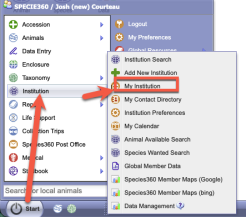
Navigate to Start > Institution > My Institution . - In the Staff at Species360 grid, locate the staff member. Use the search form to filter by name, job title, department, or team if the list is long.
- Right-click the staff record and select View/Edit Staff Details .
- In the Edit Staff Details form, open the Job Type drop-down list.
- Check one or more of the top three options: Institution Director , Species360 Invoice Recipient , and/or Species360 Representative .
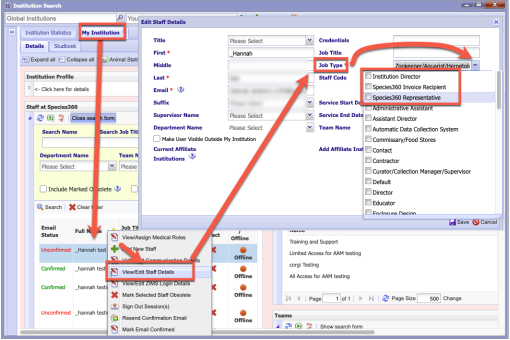
- Click Save .
Things to Note
• Invoices are delivered by email, so each designated staff member must have a current, valid email address on their staff record.
• When an invoice contact leaves your institution, update the staff list: assign one of the three Job Types to their replacement and mark the departed staff member obsolete so invoices are not sent to an unmonitored address.
Revised 10 June 2026