



SPECIES COUNT DIFFERENCES
Explains why Species counts may be different across various ZIMS Tools.
Contact support@Species360.org
There are several Tools in ZIMS that display a count by Species. For these Tools, ZIMS calculates the counts using different parameters.
Global Member Data
Start > New Features > Global Member Data
Institution Statistics
Start > Institution > My Institution > Statistics tab
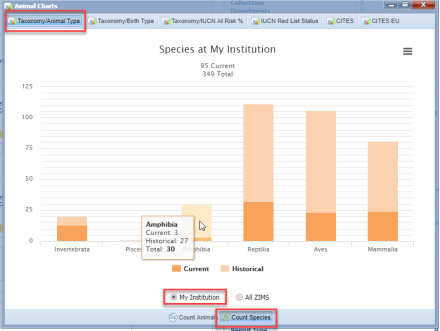
ZIMS looks at both Physical and Ownership status for this count. It only includes living animals. It also includes open groups with a count of zero. Species and Subspecies are counted separately.
The total count here is higher (115) than in the Chart because some Species counted may only be out on loan (not counted in the Chart) and Subspecies are included.
Inventory Detail Report
Reports > Inventory Detail Report
The Species counts displayed at the end of Inventory Detail Report will depend on what report filters are selected. The counts will also depend on the Taxonomic Resolution selected.

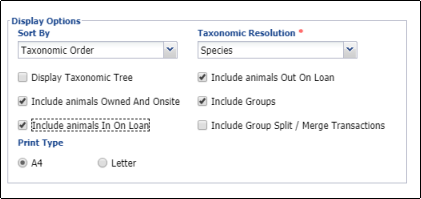
The total species count here (175) is higher than either of the previous counts. Reasons this count may be higher are 1) if you hold a species as both Individual Animals and Groups, the Species will be counted in both entities and 2) if you hold a Species on site but also have that Species out on loan, the Species will be counted twice. This report does not include Species with only open groups with a count of 0 (so this might actually make this count be lower than the other two).
The Summary Inventory Report does not display a Species count at the end.
Revised 19 November 2025
.
It is the mission of Species360 to facilitate international collaboration in the collection and sharing of information on animals and their environments for zoos, aquariums and related organizations.
www.Species360.org – Global Information Serving Conservation