



ASSIGNING PERMITS
How to assign permits to an animal record.
Contact support@Species360.org
Permits are managed under My Institution and the Role access is assigned under the Institution module. For complete information on adding and managing permits see Managing Permits . This document covers how to assign permits already recorded in My Institution to an animal record. The access to do this is assigned under the Animals module.
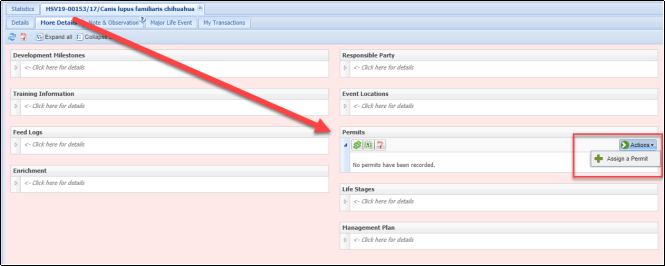
Permits are found under More Details > Permits grid. Select Actions > Assign Permit to assign a permit to the record.
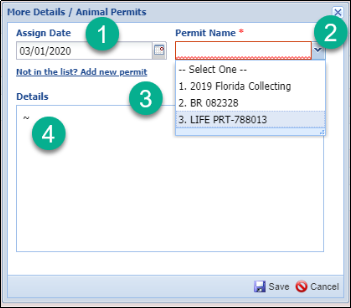
1.The Assign Date could be the date the permit was granted or the date the animal was acquired if the permit was already obtained.
2.Permit Name is a dropdown list of all your recorded permits. If you want to assign multiple permits you will need to do so individually.
3.If the permit is not on the list you can add it here if you have the Role access to do so.
4.The Details are sourced from the Add New Permit screen and cannot be recorded/edited here.
To edit the Assign Date, the Permit itself or any Details select the permit > View/Edit selected
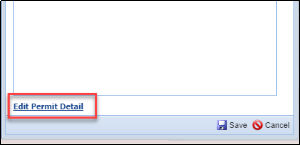
You can also edit the permit details as recorded under My Institution by selecting the Edit Permit Detail hyperlink (if you have the access).
To delete the permit select Actions > Delete > Delete Selected.
Revised 5 March 2025
It is the mission of Species360 to facilitate international collaboration in the collection and sharing of information on animals and their environments for zoos, aquariums and related organizations.
www.Species360.org – Global Information Serving Conservation