



Animal Profiles
Topics
• Role and Access Requirements
• Accessing the Animal Profile
○ Identity and Status
○ Identifiers
○ Physical Measurements
○ Health Status
○ Animal Lists
• Editing from the Animal Profile

Role Management
The Animal Profile is available to any user who can access the new interface (zims2.species360.org). No additional role permissions are required beyond what is already needed to view accessions, daily activity, or samples records.
The profile is available for local animals only — animals held or historically held at your institution. It is not accessible for animals belonging to other institutions.
Access
You can open an animal's profile from any of these views:
• Accessions list: The Animal ID (Local ID) is displayed in blue. Click it to open the animal's profile in a new tab.
• Daily Activity: Animal identifiers in the Daily Activity view are displayed as clickable links. Click the identifier to open the profile in a new tab.
• Samples: Animal identifiers in the Samples view are also linked. Note: AAM institutions cannot click through to the Animal Profile from Samples.
In all cases, the profile opens in a separate browser tab, allowing you to continue working in the originating view.
Direct URL format:
The Animal Profile has a stable, bookmarkable URL: zims2.species360.org/animals/{GAN}.
Profile Layout and Fields
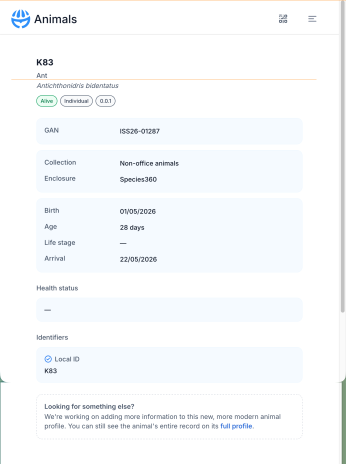
Identity and Status
The top of the profile displays the animal's core identity information:
• Ranked ID — the primary displayed identifier (e.g. Local ID or Global AN)
• Common Name / Scientific Name
• Status — displayed as Alive or Dead as a status badge
• Census / Sex — e.g. 1.0, 0.1, U — shown as the animal's sex type
• Local ID — shown only if different from the Ranked ID displayed in the header
• GAN — the Global Animal Number
• Owner — displayed only if different from your institution. Shows "Owner" if the animal is alive, "Last owner" for any other status. Hidden if the animal is dead.
• Holder — displayed only if different from your institution. Shows "Holder" if the animal is alive, "Last holder" for any other status. Hidden if the animal is dead.
• Collection — current collection, shown only if the animal is currently held at your institution
• Enclosure(s) — current enclosure(s), shown only if the animal is currently held at your institution
Dates and Age
• Birth date — displayed as a date or estimate, following the same format used in the legacy ZIMS profile. Displays the global birth date unless a different local birth date exists, in which case the local date is shown. If the birth date is not globally shared, the field displays "not shared globally".
• Age — calculated and displayed in the format: 4 years 10 months 19 days
• Life stage — current life stage; shows an em dash (—) if not recorded
• Arrival date — the accession date. Not shown if the accession was a birth transaction.
• Reason(s) for admission — shows the first and last reason if multiple are recorded. If the list is long, middle entries are truncated with … and the full list is visible on hover.
An em dash (—) is used in place of any field that has no recorded value — this applies to Collection, Enclosure, Life stage, and Health status.
Identifiers
The Identifiers section lists all active identifiers for the animal.
• Preferred ID — always listed first
• Remaining identifiers are listed in ranked order below the Preferred ID
• Only local identifiers are shown in the current release, with the exception of studbook numbers that appear on husbandry records sourced from the studbook module (regional/global studbook numbers)
Physical Measurements
Weights and Body Condition Score (BCS)
• Last weight — the most recent recorded weight and its date, regardless of weight type. Special cases:
○ If the last weight is a dead weight, the dead weight is shown
○ If an egg hatched and has a post-hatch weight, the live weight is shown
○ Estimated weights are indicated with a ~ symbol
○ Provisional weights are indicated with a Provisional icon; once approved, the icon is removed
• Last BCS — the most recent Body Condition Score and its recorded date
Length Measurements
• If the animal has only one length type recorded, the most recent measurement and date are shown
• If the animal has more than one length type, the most recent measurement for each of the last 2 length types is shown, along with recorded dates
• Measurement type and any descriptors are shown before the value
Display preferences
The profile respects the following institution preferences:
• Display medical weights in the animal husbandry record (on/off)
• Date formatting (follows your personal preferences)
Health Status
The current health status is shown as a badge with the recorded date. An em dash is displayed if no health status has been recorded.
Animal Lists
All animal lists the animal currently belongs to are displayed as chips (tags). In the current release, chips are display-only — lists cannot be added or removed from the Animal Profile directly. Use the Accession flow or the legacy ZIMS profile to manage list membership.
Editing from the Animal Profile
The Animal Profile is view-only. To edit animal data, use one of the following options:
- Accession edit screen — from the Accessions list, open the accession and use the edit view. A "Looking for something else?" callout at the bottom of the edit screen links directly to the full legacy profile.
- Full ZIMS profile (OG) — click the "full profile" link in the edit screen callout, or navigate directly in legacy ZIMS. The legacy profile opens in a new tab.
Species360 is actively expanding these new features. Additional edit capabilities will be added to the Animal Profile in future releases.
Revised 28 May 2026