



ZIMS Accessions
The new Accessions option under New Features will replace the legacy accession options in ZIMS. The new Accessions List provides a modernized, data grid layout of recent accessions and the New Accession option will cover all accession types in the future, currently supporting individual and group rescues.
Topics
Role Management
Access
Accessions List, Templates and Filters
New Accession Flow
Date Estimation and Unknowns
Reason for Admission Standard
Earlier Known Location
Add to Animal List
Save and add data

Role Management
Role access can be granted by a Local Admin through Role Management. If you have rights to "Accession > add" you can record accessions through this workflow. Previously, “Acquisition/Disposition transaction > add" rights, also allowed access during the transition to the new accession form, but now only Accession>Add rights are required.
Access
When logged into ZIMS, you can access the new Accessions tool from the Start menu, New Features:
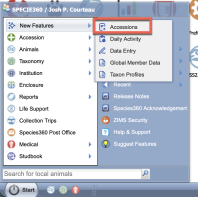
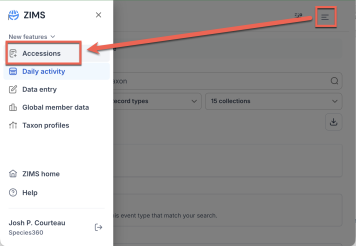
Alternatively, you can access the new features directly:
https://zims2.species360.org/
- from the navigation menu, access Accessions:
Accessions List, Templates and Filters
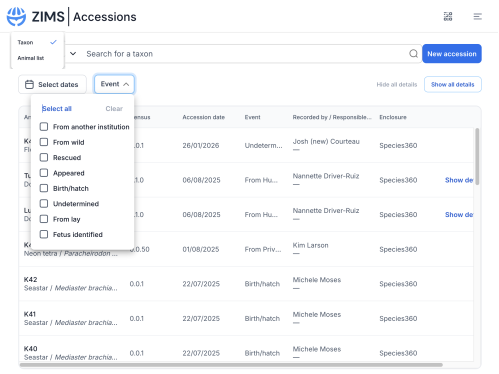
The Accessions landing page features a modern, streamlined data grid layout. The accessions list view includes all accession types except for incomplete accessions.
- Columns : The list displays the Animal (Local ID, Common Name, and Scientific Name), Census, Accession Date, Event type, Recorded by / Responsible party, and current Enclosure. You can sort on the accession date column.
- Accession Templates: Accession templates are not shared with the legacy ZIMS desktop accession workflow. You will have to recreate accession templates in the new accession screens. As an improvement over the legacy version, the new templates are automatically shared by all staff that have permissions to start an accession.
- The Animal ID will open in the new Animal Profile to provide additional details on the animal in focus.
Managing Templates:
- Under the New Accession button, click the drop down arrow to start a new template or edit existing templates:
Editing an existing template will pull up the following screen where you can either edit or delete an existing template. A reminder, these new accession templates are shared across your entire team – so consult your teammates before deleting templates.
-
After entering the template data that you wish to be saved for future accession – the last screen offers you the option to “Save Template” and to “Start a new accession with template” - to launch your first template accession!
- Approaching the accession screen after adding a Template, you will see the option to use the template at the start of the workflow at the top – this will overwrite any data entered in the current form with the saved template data.
-
Filtering
: The accessions list includes several filters to narrow results:
- A “Taxon / Animal list” dropdown at the top left lets you switch between searching by taxon or by animal list.
-
An “Event” multi-select dropdown filters by accession event types:
(From another institution, From wild, Rescued, Appeared, Birth/hatch, Undetermined, From lay, Fetus identified). - Event terms show in additional column: (Physical, Ownership or both)
- A “ Reason for admission ” multi-select dropdown filter allows you to show selected reason.
- A “Select dates” button filters by date range.
- Users can also use the “Hide all details” and “Show all details” toggle buttons to adjust the visibility of extended row information.
Accessions List
New Accession Flow
The new format integrates rescue management directly into the standard accession flow rather than separating it as a distinct module. While all the core details are the same from legacy accession, a few changes have been made in the new version.
Date Estimates and Unknown
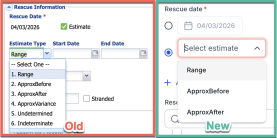
The date estimation options have been simplified.
When information is uncertain, options have been limited to unknown and Undetermined - removing ‘indeterminate’.
Reason for Admission Standard
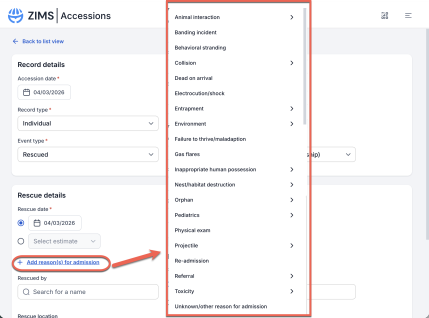
The Reason for Admission data standard is a new addition to the rescue flow.
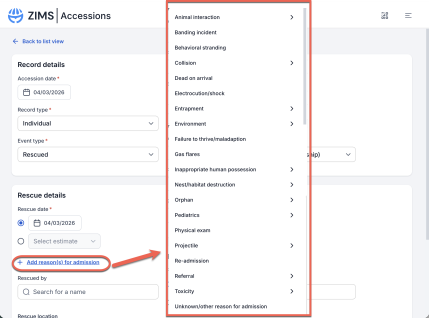
- It is found within the “Rescue details” section. You can initiate it by clicking the “ + Add reason(s) for admission ” button.
- The field follows a standardized list, including common intake scenarios such as Orphan, Failure to thrive/maladaption, Behavioral stranding, Collision, Entrapment , and more.
- It allows for multiple reasons to be selected simultaneously, providing a much more granular clinical or situational history for rescued animals.
Reason for admission
Earlier Known Location
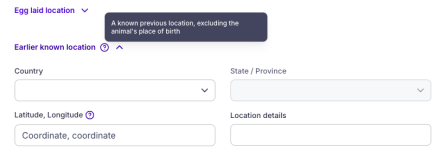
A new optional field has been added to capture what is believed to be the origin or earliest known location to distinguish an accession’s origin from the immediate rescue site for better tracking of disease outbreaks, trafficking routes, etc.
Add to Animal List
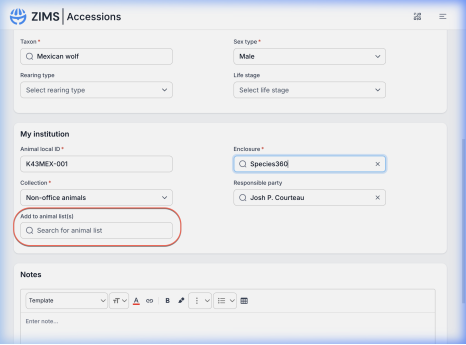
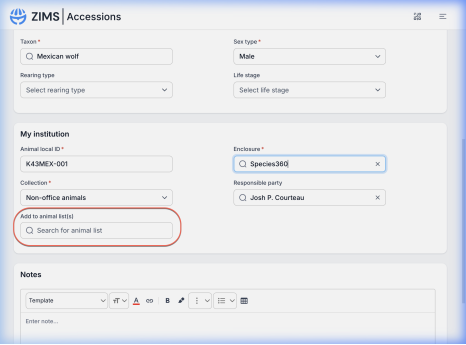
A key efficiency enhancement in the new format is the “Add to animal list” capability available directly within the accession flow.
- Located in the My institution step, users can search for existing animal lists to add the new individual to immediately.
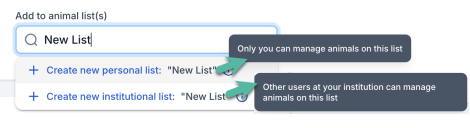
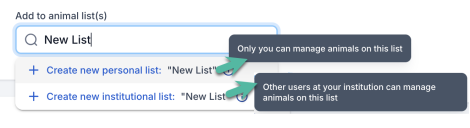
- If a user types a list name that doesn’t exist, a “ Create new institutional list ” option automatically appears, allowing a new institutional list to be created without ever exiting the accession process. Institutional lists are shared and managed by all institution users.
- A “ Create new personal list ” option is also available. Personal lists are visible only to the creating user (or a Local Admin). Only that user or a Local Admin can add or remove animals from the list, or delete it.
Add to Animal List
Save and Add Data
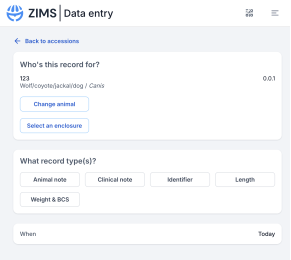
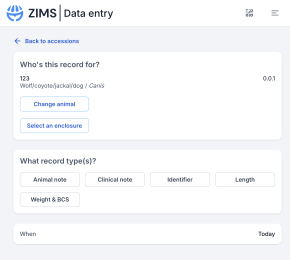
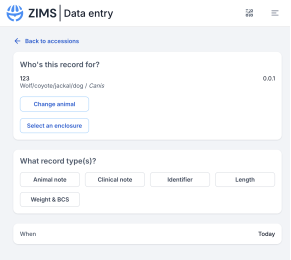
A key efficiency enhancement. After completing an accession, click the chevron (∨) next to the “Save” button and select “Save and add data” to be redirected to the Data Entry (OTG) screen with the newly accessioned animal pre-selected. A “Back to accessions” arrow at the top of OTG returns you to the accessions list when you are done.
Revised 28 May 2026